
EggTicketing Console Manual
The EggTicketing Console (ETC) is an admin panel with a graphical interface that lets you manage the ET3 system. To set it up, make sure this line in your ETM configuration script is set as follows:
Settings.ETCEnabled = true
Also, make sure this variable is set too:
Settings.GroupID
Now, set up permissions for ETC. In most cases, this is already set up for you and you can skip this step. Find this in your configuration script:
Settings.ETCPermissions = {
	Viewers = {
		Users = {},
		Roles = {}
	},
	Moderators = {
		Users = {},
		Roles = {}
	},
	Managers = {
		Users = {},
		Roles = {}
	}
}
This allows you to set up permissions for each permission level. Read more about permission levels later.
Users expects user IDS, not usernames!
Roles expects Ranks, not role names!
You can add multiple users and/or ranks. Below is an example:
Moderators = {
	Users = {13456789, 987654321}, -- 2 users will have access
	Roles = {20, 30, 50} --all users in these ranks will have access
},
Understanding Terms
- ET3: The whole system.
- ETM: EggTicketing Manager, a mandatory service that runs in the background of the Roblox Experience. Machines cannot start up or function properly without ETM. This service is responsible for the functionality of ETC, logging events, analytics, receipts, verifying whitelists, saving/loading inventories, and more. ETM is the only instance that directly communicates with Eggnos Servers.
- ETC: The EggTicketing Console. You're reading about this now. This can also be referred to as an "Admin Panel". It allows you to manage the ET3 system. When using ETC, clients are directly communicating with ETM.
Usage
To open ETC, say this in text chat: !etc.
Users who don't have permission cannot use this command.
Permission Levels
1. Viewer
- General Description: Access to ETC, but can only view and not make any changes.
- Page Access
- Inventories: Yes
- Machines: Yes
- Logs: No
- Analytics: No
- Info: Yes
- Permissions
- Can view the inventory of users, but cannot add, edit, or delete tools
- Can view machines, show/hide machine IDs, teleport to machines, but cannot restart them or change the open status.
2. Moderator
- General Description: Access to ETC, with limited editing permissions.
- Page Access
- Inventories: Yes
- Machines: Yes
- Logs: No
- Analytics: No
- Info: Yes
- Permissions
- Can view the inventory of users and can add, edit, or delete tools
- Can view machines, show/hide machine IDs, teleport to machines, restart them or change the open status. Cannot restart all machines at once.
3. Manager
- General Description: Full access of all functions of ETC.
- Page Access
- Inventories: Yes
- Machines: Yes
- Logs: Yes
- Analytics: Yes
- Info: Yes
- Permissions
- Can view the inventory of users and can add, edit, or delete tools
- Can view machines, show/hide machine IDs, teleport to machines, restart them or change the open status, and restart all machines at once.
- Can view ETM logs and analytics.
⚠️ Note
When a user shows or hides Machine IDs, it only makes changes for them and does not affect other players. Therefore, viewers are granted this permission as well.
System info is shown to viewers because it does not contain any sensitive information.
Pages
Inspect Inventories
Info coming soon
Manage Machines
This page lets you see all machines that have been registered with ETM. Each card shows the ID of the machine, the code, and when it started.
Machine codes
- Offline
- Starting
- Active
- Sleeping (Currently not in use)
- Error
Restart Feature
You can restart machines individually (moderator), or all at once (manager). Restarting machines can be useful if the machine is being slow, is bugged or doesn't detect a crashed state. When a machine shows code 4, the machine knows it needs to be restarted. In that case, a restart will be done automatically within a minute.
Notes:
- If the machine is already restarting, further requests will be ignored.
- It can take up to 1 minute for the machine to reboot.
- A ticket machine will reboot immediately, even if a player is interacting with it, unless:
- The machine is in the printing process of cards or tickets. The machine will wait until this process is done, as a sudden shutdown in this process will cause issues.
- A fare gate will reboot immediately, unless:
- A player is currently passing through the gate. The machine will restart when the doors close, as a sudden shutdown in this process will cause issues.
Teleporting to machines
Press the "Teleport To" button to teleport to the machine.
Show IDs
Each machine has a BillBoardGui that shows you their ID in the Workspace. Their ID will appear above the machine model.
This feature can be used to easily identify a machine. Follow these steps:
- Press "Show All Machine IDs" at the top of the Inspect Inventories page.
- Look at the machine in front of your. The ID will be visible.
- Enter the ID in the search box to find it in ETC.
- You can now perform any preferred action, such as restarting/closing/opening it.
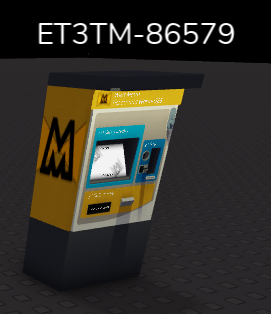
Note!
IDs for machines are only shown in your client's rendering distance. If you can't see many Machine IDs, try moving to a different location or set your graphics level higher.
Close/Open Machine
You can close or open machines as needed. Machines could be closed to simulate maintenance on them. If you open or close a machine, you need to restart it in order to apply changes. Note that your changes are reset after the server shuts down. To make these changes permanent, find the machine in Roblox Studio and set the InService value to true or false to set the machine's status at server start.
ETM Log
This page shows you useful logs for ETM. Events from staff members are logged as well.
Gray backgrounds on logs
Logs that have gray backgrounds are logs that haven't been uploaded to the cloud yet. It can take up to 1 minute for logs to be uploaded to the cloud.
Logs are stored in the cloud to allow Eggnos to find issues and resolve them. Furthermore, keeping these logs can be useful for moderation purposes.
Logs are deleted at 10.000 entries or if they're older than 30 days. If 10.000 entries are exceeded, old entries will be deleted to make space for new ones.
Analytics
System Info
Info coming soon